テスト方法
このドキュメントでは、ft_irc サーバプログラムのテスト方法と、各テストの種類、環境設定について説明します。
ft_irc プロジェクトは、test/ ディレクトリにサブモジュールとして管理されている ft_irc_test リポジトリを使用してテストを行います。このリポジトリには、ユニットテスト、統合テスト、スクリプトテスト、性能テストが含まれています。
1. テストリポジリの準備
ft_irc_test リポジリは、メインの ft_irc リポジリの test/ ディレクトリにクローンする必要があります。
git clone git@github.com:kamitsui/ft_irc_test.git testまたは、make コマンドを実行する際に自動的にクローンされます。
ft_irc プロジェクト内のMakefile設定例
# REPOSITORY for Test
TEST_DIR = test
URL_TEST_REPO = "https://github.com/kamitsui/ft_irc_test.git"
UNIT_TEST_TARGET = $(TEST_DIR)/unit_tests/ft_irc_unittest

# Unit Test
unit_test:
ifeq ($(shell test -d $(TEST_DIR) && echo exist),)
	@echo "Please clone the test repository"
	$(call ASK_AND_EXECUTE_ON_YES, git clone $(URL_TEST_REPO) $(TEST_DIR))
endif
	$(MAKE) -C $(TEST_DIR)/unit_tests
.PHONY: unit_test

# Integration Test
test:
	@echo "Building server for testing..."
	$(MAKE) CXXFLAGS="$(CXXFLAGS) -DTEST_BUILD" re
    $(MAKE) -C $(TEST_DIR)/integration_tests
.PHONY: test

# Rule for removing object & dependency files
clean:
	rm -rf $(OBJ_DIR) $(DEP_DIR) $(TEST_DIR)/objs $(TEST_DIR)/.deps
.PHONY: clean

# Rule for removing Target & others
fclean: clean
	rm -f $(NAME) $(UNIT_TEST_TARGET)
.PHONY: fclean
2. テスト環境のセットアップ
ユニットテスト用環境
ユニットテストの実行には googletest フレームワークが必要です。
- 校舎PC (
goinfre):goinfreにbrewをインストールしている場合、以下のコマンドでgoogletestをインストールできます。インストールには約5分かかります。shbrew install googletestgoinfreにbrewをインストールする方法mfunyuさんの https://github.com/mfunyu/config を参考
- 個人PC:
googletestのインストール先を.envファイルで指定できます。test/unit_tests/.envファイルが存在しない場合、env_exampleをコピーして設定してください。shcp test/unit_tests/env_example test/unit_tests/.env.envファイルの例:# Google Test Path # My environ (Ubuntu22.04) : Define this variable in .env file. CXXFLAGS = -Wall -Wextra -Werror -std=c++14 -I/usr/include -pthread LIBS = -L/usr/lib -lgtest -lgtest_main
スクリプトテスト用環境
スクリプトテスト (test/scripts/) の実行には tmux コマンドが必要です。必要に応じてインストールしてください。
3. テストの実行
プロジェクトのルートディレクトリで make コマンドを使用してテストを実行できます。
統合テストの実行
make testこのコマンドは以下の処理を行います。
- サーバーをテストビルド (
-DTEST_BUILDフラグを付けてre) します。 ft_irc_testリポジリがクローンされていない場合、自動的にクローンします。test/integration_tests/ディレクトリ内の統合テストを実行します。
PING/PONGタイムアウトに関する注意
make test で統合テストを実行する際、サーバーは -DTEST_BUILD フラグを付けてビルドされます。これにより、PING/PONGコマンドのタイムアウト設定がテスト用に短縮されます (integration_tests/test_04_ping_pong.py では2秒以内に応答がないと失敗します)。
例: サーバーコードでの定義
// Define PING/PONG timeouts based on build type
#ifdef TEST_BUILD
#define PING_TIMEOUT 1 // Longer timeout for testing
#define PONG_TIMEOUT 2
#else
#define PING_TIMEOUT 120 // Standard timeout for production
#define PONG_TIMEOUT 20
#endif
ユニットテストの実行
make unit_testこのコマンドは以下の処理を行います。
ft_irc_testリポジリがクローンされていない場合、自動的にクローンします。test/unit_tests/ディレクトリ内のユニットテストをビルドし、実行します。
4. 各テストコードの説明
ft_irc_test/ リポジリのディレクトリ構成と各テストの種類は以下の通りです。
ft_irc_test/
│
├── scripts/                # IRCクライアント irssi を使ったテスト
│
├── unit_tests/             # 各クラスを単体でテストするコード
│   ├── test_parser.cpp
│   └── ...
│
├── integration_tests/          # 複数クラスを組み合わせてテストするコード
│   ├── conftest.py             # 各テスト実行前にサーバーを起動するスクリプト
│   ├── client_helper.py        # ソケット通信・IRCコマンドのためのヘルパークラス
│   ├── test_01_connection.py   # クライアント接続と登録の基本動作
│   ├── test_01_connection.py   # メッセージ送信
│   └── ...
│
└── performance_tests/      # 性能や耐久性をテストするコード (未検証)
    ├── irc_load_test.py
    └── ...
ユニットテスト (Unit Tests)
特定の機能やクラスの単体テストを行います。googletest フレームワークを使用しています。
- テスト対象の例:
ClientBufferTest: クライアントバッファの読み書き処理CommandTest: PASS, NICK, USER, PING コマンドの基本的な動作ChannelTest: チャンネルのメンバー管理、トピック、オペレータ、モード管理ChannelCommandsTest: JOIN, PRIVMSG, PART コマンドNoticeCommandTest: NOTICE コマンドNamesCommandTest: NAMES コマンドTopicCommandTest: TOPIC コマンドModeCommandTest: MODE コマンド (オペレータ、トピック保護、外部メッセージ、キー、制限、招待専用など)KickCommandTest: KICK コマンドListCommandTest: LIST コマンドWhoCommandTest: WHO コマンドWhoisCommandTest: WHOIS コマンドInviteCommandTest: INVITE コマンドRepliesTest: 各種IRC応答メッセージ (RPL_WELCOME, ERR_NOSUCHNICK など)CommandManagerTest: コマンドマネージャの実行、クライアント切断処理
テスト結果
./ft_irc_unittest
[==========] Running 133 tests from 15 test suites.
[----------] Global test environment set-up.
[----------] 8 tests from ClientBufferTest
[ RUN      ] ClientBufferTest.ReadLine_SingleLineCRLF
[       OK ] ClientBufferTest.ReadLine_SingleLineCRLF (0 ms)
[ RUN      ] ClientBufferTest.ReadLine_SingleLineLF
[       OK ] ClientBufferTest.ReadLine_SingleLineLF (0 ms)
[ RUN      ] ClientBufferTest.ReadLine_MultipleLines
[       OK ] ClientBufferTest.ReadLine_MultipleLines (0 ms)
[ RUN      ] ClientBufferTest.ReadLine_PartialLine
[       OK ] ClientBufferTest.ReadLine_PartialLine (0 ms)
[ RUN      ] ClientBufferTest.ReadLine_Empty
[       OK ] ClientBufferTest.ReadLine_Empty (0 ms)
[ RUN      ] ClientBufferTest.SendBuffer_AppendAndGet
[       OK ] ClientBufferTest.SendBuffer_AppendAndGet (0 ms)
[ RUN      ] ClientBufferTest.SendBuffer_RemoveSentData
[       OK ] ClientBufferTest.SendBuffer_RemoveSentData (0 ms)
[ RUN      ] ClientBufferTest.SendBuffer_RemoveFromEmpty
[       OK ] ClientBufferTest.SendBuffer_RemoveFromEmpty (0 ms)
[----------] 8 tests from ClientBufferTest (0 ms total)

...

[----------] 10 tests from CommandManagerTest
[ RUN      ] CommandManagerTest.ExecuteSimpleCommand
[       OK ] CommandManagerTest.ExecuteSimpleCommand (0 ms)
[ RUN      ] CommandManagerTest.ExecuteCommandWithTrailingArg
[       OK ] CommandManagerTest.ExecuteCommandWithTrailingArg (0 ms)
[ RUN      ] CommandManagerTest.ExecuteUnknownCommand
[       OK ] CommandManagerTest.ExecuteUnknownCommand (0 ms)
[ RUN      ] CommandManagerTest.ExecuteCaseInsensitiveCommand
[       OK ] CommandManagerTest.ExecuteCaseInsensitiveCommand (0 ms)
[ RUN      ] CommandManagerTest.ExecuteEmptyCommand
[       OK ] CommandManagerTest.ExecuteEmptyCommand (0 ms)
[ RUN      ] CommandManagerTest.ExecuteCommandWithoutArgs
[       OK ] CommandManagerTest.ExecuteCommandWithoutArgs (0 ms)
[ RUN      ] CommandManagerTest.ExecuteQuitCommandWithMessage
[       OK ] CommandManagerTest.ExecuteQuitCommandWithMessage (0 ms)
[ RUN      ] CommandManagerTest.ExecuteQuitCommandWithoutMessage
[       OK ] CommandManagerTest.ExecuteQuitCommandWithoutMessage (0 ms)
[ RUN      ] CommandManagerTest.ExecutePongCommandUpdatesActivityTime
[       OK ] CommandManagerTest.ExecutePongCommandUpdatesActivityTime (0 ms)
[ RUN      ] CommandManagerTest.RemoveClientCleansUpChannels
Client client1_nick (fd: 10) disconnected.
[       OK ] CommandManagerTest.RemoveClientCleansUpChannels (0 ms)
[----------] 10 tests from CommandManagerTest (0 ms total)

[----------] Global test environment tear-down
[==========] 133 tests from 15 test suites ran. (2 ms total)
[  PASSED  ] 133 tests.
統合テスト (Integration Tests)
複数のクラスやコンポーネントを組み合わせて、システム全体の動作を検証します。pytest フレームワークを使用しており、IRCクライアントとサーバー間の通信を模擬しています。
- テスト対象の例:
test_01_connection.py: クライアントの接続と登録の基本動作test_02_messaging.py: メッセージ送受信test_03_quit.py: クライアントの切断test_04_ping_pong.py: PING/PONG 応答 (タイムアウトを含む)test_05_notice.py: NOTICE コマンドの動作test_06_multi_channel_ops.py: 複数のチャンネル操作test_07_names.py: NAMES コマンドtest_08_topic.py: TOPIC コマンドtest_09_mode.py: MODE コマンドの各種設定test_10_kick.py: KICK コマンドtest_11_list.py: LIST コマンドtest_12_who.py: WHO コマンドtest_13_whois.py: WHOIS コマンドtest_14_join.py: JOIN コマンドtest_15_invite.py: INVITE コマンドtest_16_non_blocking_write.py: ノンブロッキング書き込みの検証
テスト結果
.venv/bin/pytest .
============================= test session starts ==============================
platform linux -- Python 3.10.12, pytest-8.4.2, pluggy-1.6.0
rootdir: /app/test/integration_tests
collected 51 items

test_01_connection.py ...                                                [  5%]
test_02_messaging.py ..                                                  [  9%]
test_03_quit.py ..                                                       [ 13%]
test_04_ping_pong.py ....                                                [ 21%]
test_05_notice.py ...                                                    [ 27%]
test_06_multi_channel_ops.py ...                                         [ 33%]
test_07_names.py ...                                                     [ 39%]
test_08_topic.py ....                                                    [ 47%]
test_09_mode.py ..........                                               [ 66%]
test_10_kick.py ....                                                     [ 74%]
test_11_list.py .                                                        [ 76%]
test_12_who.py .                                                         [ 78%]
test_13_whois.py .                                                       [ 80%]
test_14_join.py ......                                                   [ 92%]
test_15_invite.py ...                                                    [ 98%]
test_16_non_blocking_write.py .                                          [100%]

============================= 51 passed in 41.90s ==============================
スクリプトテスト (Script Tests)
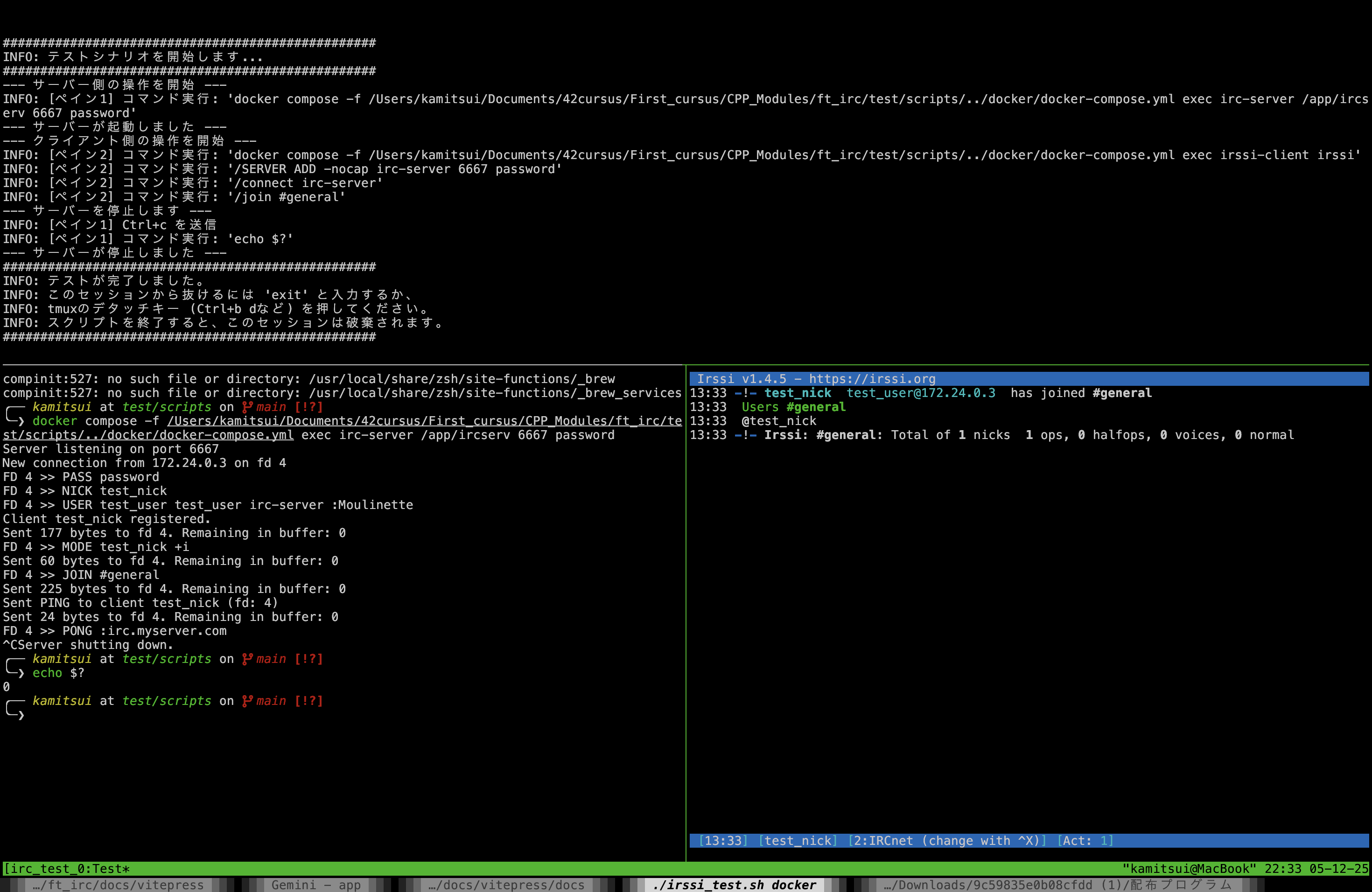
test/scripts/ ディレクトリに格納されており、実際の irssi クライアントを使用してサーバーとのインタラクションをテストします。
動作画面
性能テスト (Performance Tests) (開発中)
test/performance_tests/ ディレクトリに格納されており、サーバーの負荷や耐久性を検証することを目的としています。現在はまだ開発中です。
- テスト対象の例:
irc_load_test.py: 負荷テスト